
The art gallery app enhances museum or gallery visits by providing quick access to artwork information. By taking a photo of an artwork, the app can identify the artist, title, medium, and historical context.
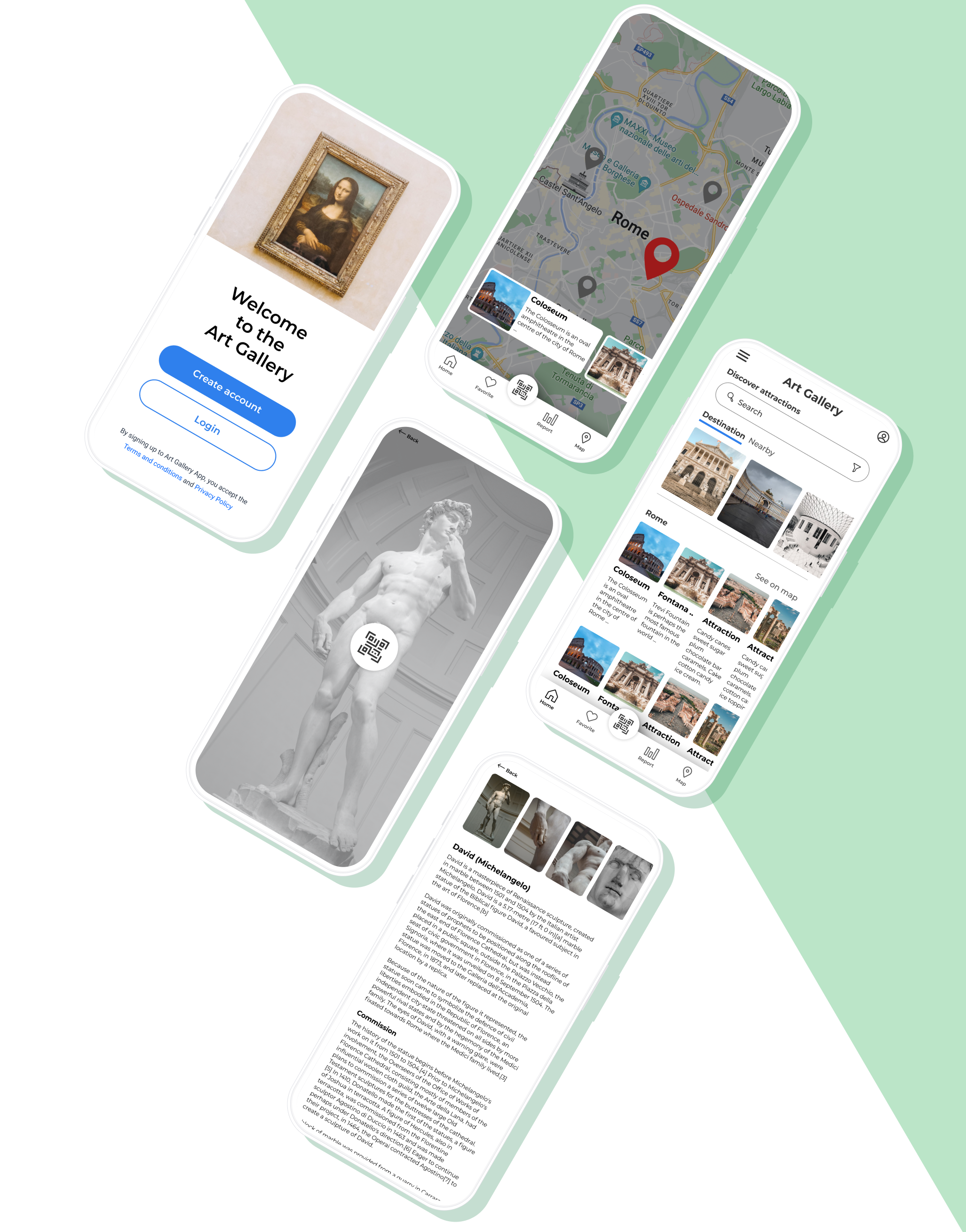
The Art Gallery App allows you to take a photo of an art item and returns the information about that art is a mobile application designed to enhance the experience of visiting an art museum or gallery.

The artGallery App is designed to enhance the experience of visiting an art museum or gallery by providing users with quick and easy access to information about the artworks on display.
By simply taking a photo of an art item, the app is able to identify the artwork and provide users with detailed information about it, including the artist, title, medium, and any relevant historical context.
3 months
Surveys, Interviews, Affinity Mapping, Wireframes, Prototyping, Customer journey mapping, Solution sketching, UX and UI Design
Figma

The multitude of artworks on exhibit can easily overwhelm visitors, and many visitors struggle to remember the names, artists, and other details about the artworks they see.
This can make it difficult for visitors to fully appreciate and understand the artworks, and can lead to a less engaging and immersive experience overall. By providing users with quick and easy access to information about the artworks they encounter, an art gallery app can help to overcome this challenge and enhance the overall experience of visiting an art museum or gallery.

The primary goal of the artGallery App is to make it easy for users to learn more about the artworks they encounter during their visit, and to provide a more engaging and immersive experience overall.
Additionally, the app aims to help museums and galleries promote their collections to a wider audience by making it easy for users to share information about the artworks they discover with their friends and followers on social media.
My role as a Generalist UX designer, I designed the artGallery App from conception to the final prototype delivery for app developers.
As a generalist UX designer, I was responsible for taking a holistic, user-centered approach to the design of the app, and ensuring that all aspects of the user experience are considered. This include issues such as usability, accessibility, visual design, and overall user satisfaction. I was also responsible for staying up-to-date with the latest trends and best practices in UX design, and bringing these insights to bear on the development of the app.
To understand the needs and expectations of users, the development team conducted user research with various museum and gallery visitors, including casual art enthusiasts, students, and professional art critics.
It might be overwhelming to memorize everything before visiting a new destination, therefore this app comes in useful, providing you the opportunity to receive all the knowledge about art and history from a reliable source.
As part of the UX Design course, I chose this challenge and decided to solve it. To have a better understanding of the situation, I performed secondary research by browsing the internet for the most prevalent problems that individuals encounter when visiting art and history museums.

A user persona is based on real user characteristics, behaviors, and goals. User personas help designers understand their target public's needs and motivations.
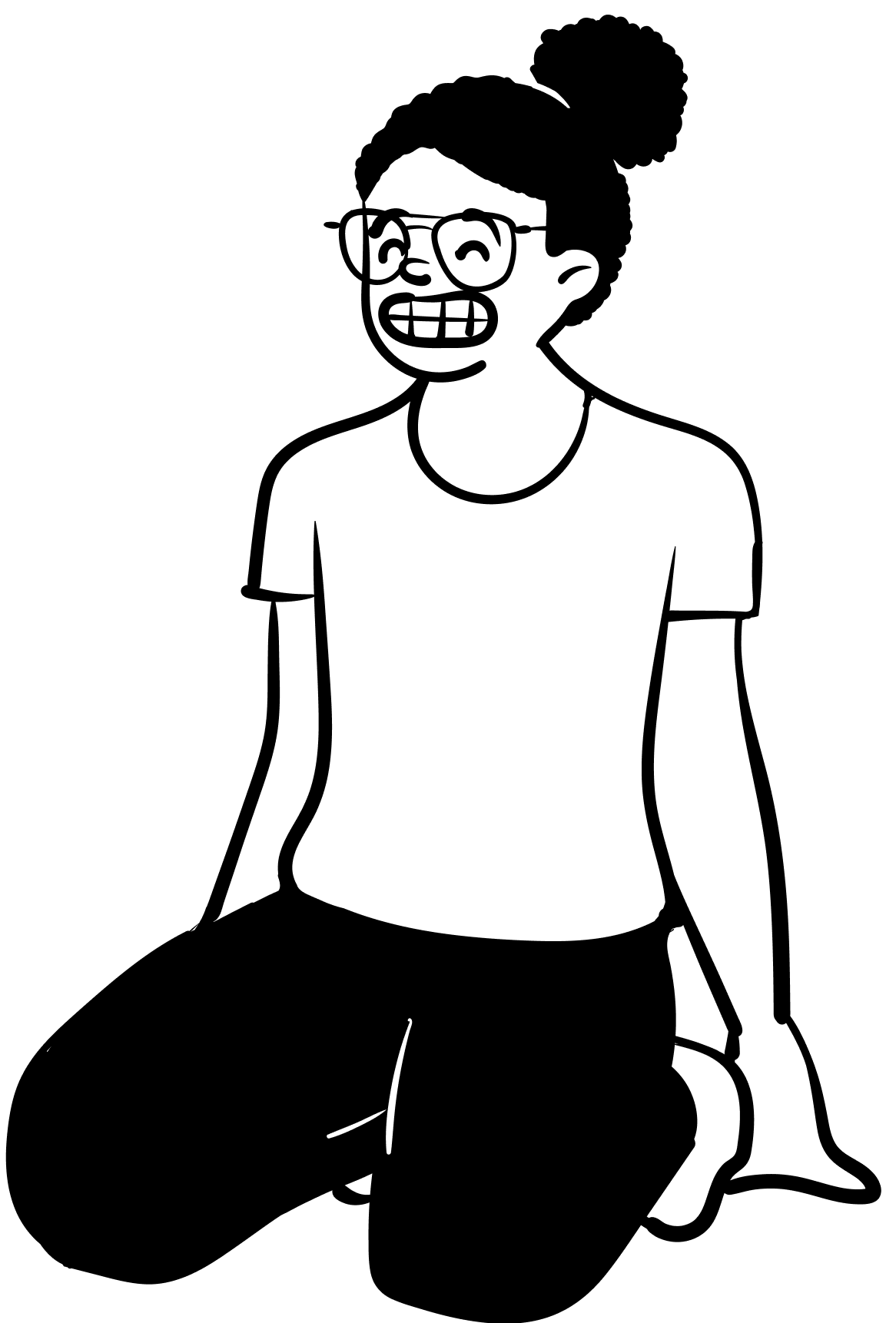

Victoria travels every two months since her job lets her work from anyplace. So, she may visit local art galleries. She wants boundless art and historical knowledge.
When she travels, it's difficult to obtain information on a specific artist or item of art, so she must do all the study herself.
When she visits a new place, she wants to learn more about the art she sees.
User research helps decide what the users really want and what we should design for users.




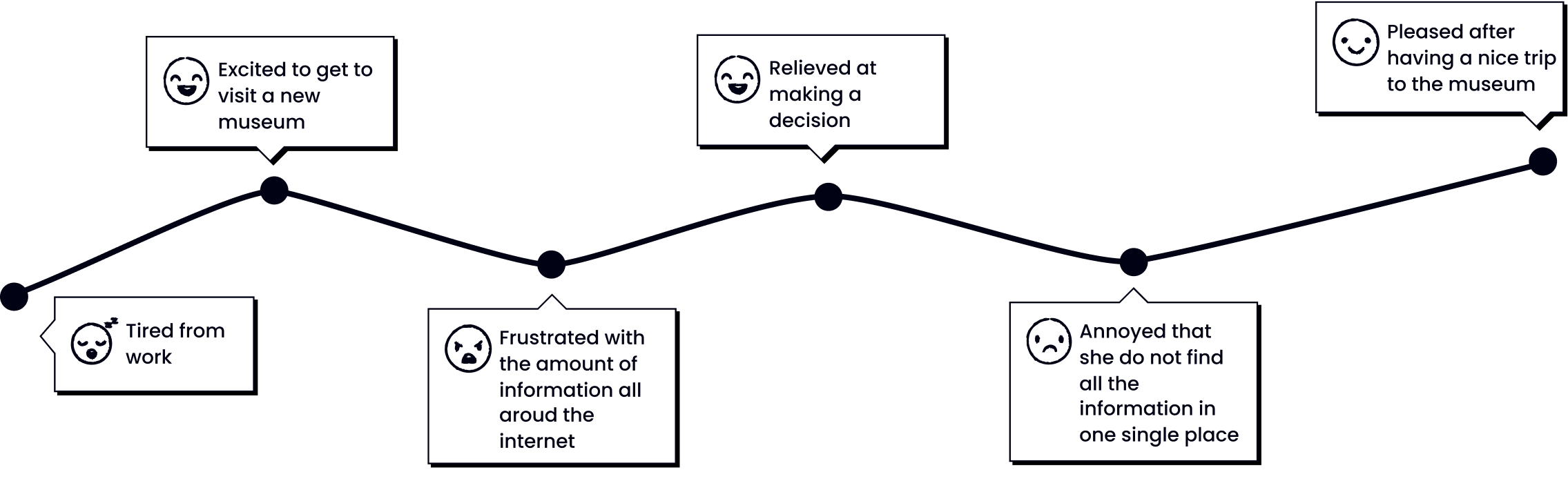
The user becomes interested in visiting an art gallery.
The user searches for local art galleries and checks their websites to learn about collections and exhibitions.
The user chooses an art gallery and searches for ticket prices, hours, and other information.
The user goes to the gallery's website to purchase tickets, or may purchase tickets through a third-party ticketing site.
The user arrives at the gallery and presents their tickets at the entrance.
The user begins exploring the galleries and comes across an art item that they are interested in learning more about.
The user begins searching online for information about the art item, using search engines and social media to find articles, reviews, and other resources.
The user finds various sources of information about the art item, including the artist's website, museum and gallery websites, and art criticism websites.
After the visit, the user continues to search for information about the art item and may share their findings with their friends and followers on social media.
"I feel so alive and energized after visiting an art gallery. The art on display always sparks my creativity and imagination."
"There's something magical about visiting an art gallery. I always leave feeling inspired and uplifted."
"Art galleries are a bit overwhelming some times, but I also love the feeling of being immersed in all of the different styles and mediums on display."
"It’s 2022, why isn’t there a centralized app to give you all the information in one place?."
"I find art galleries to be a bit intimidating, but I also love the feeling of being challenged and inspired by the work on display."
"I feel like I'm on a treasure hunt when I visit an art gallery. There's always something new and exciting to discover."
"I find art galleries to be a bit overwhelming at times, but I also love the feeling of being immersed in all of the different styles and mediums on display."
Create a dedicated mobile app that contain all the information in one place about all the art in the world.
Visually appealing UI
Provide a cam scan for the pieces of art, from where you can find all the information that you need
Provide search filters
Include images
Provide option to buy tickets from the app, keep tickets in the app
The app is able to add all the information you searched in one folder that is sharable with anyone
Using the insights from my user research and secondary research on common issues faced by museum visitors, I designed the art gallery app to be a straightforward and user-friendly tool for exploring and learning about artworks. The app includes several key features to enhance the user experience, including:

By using image recognition technology, the app is able to identify the artwork and provide users with detailed information about it, including the artist, title, medium, and any relevant historical context.

The app features audio narrations by art historians or other specialists. These tales provide context and background information on artworks in an entertaining and accessible style.

The app includes features that make it easy for users to share photos of the artworks they discover and the information about them with their friends and followers on social media.
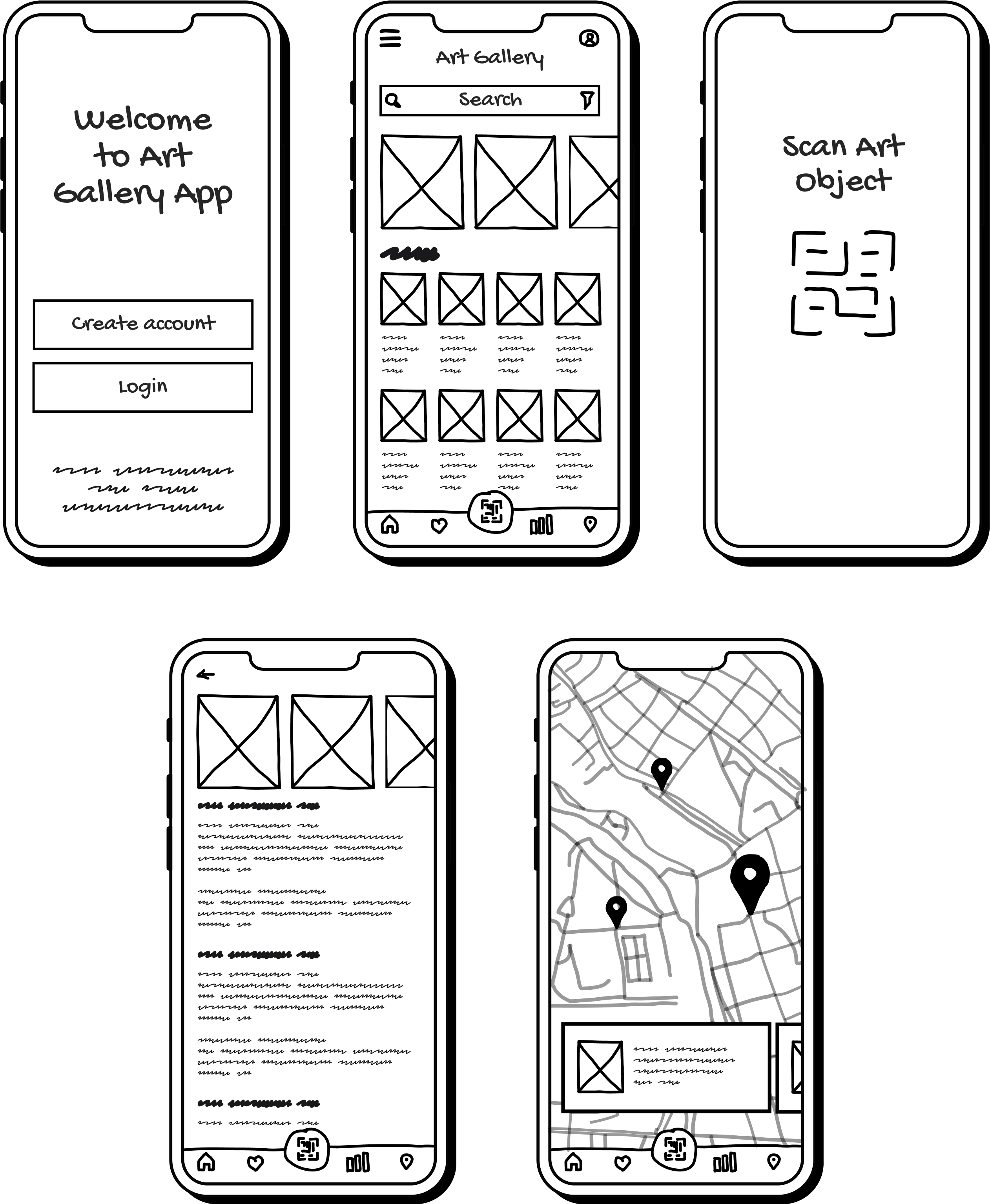
When sketching the low fidelity wireframe for the Art Gallery App, I was focusing on the overall layout and structure of the app, rather than the specific design details. This allows to quickly prototype and test different ideas, and get feedback from users or stakeholders before moving on to higher fidelity designs.
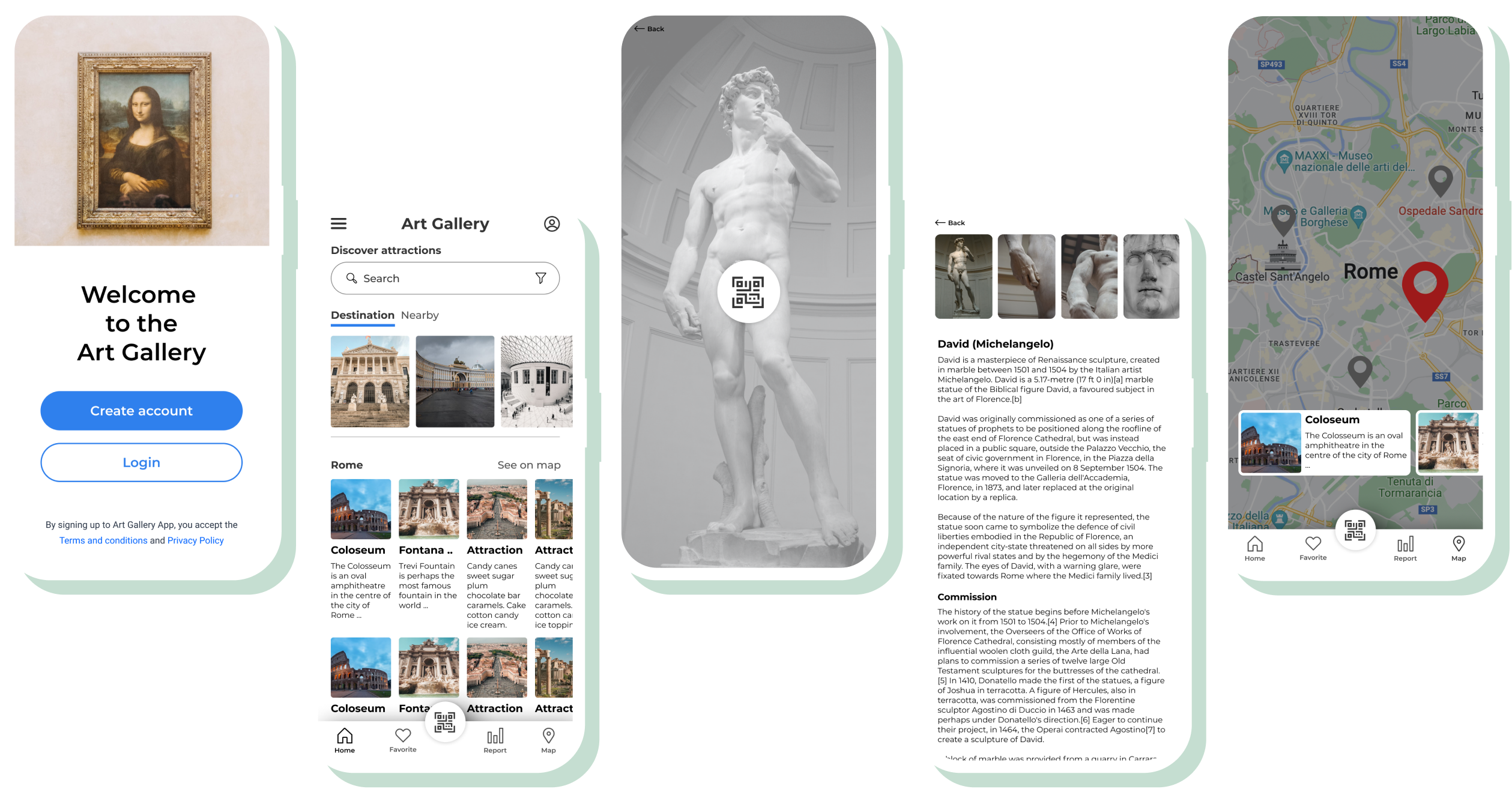
Creating a high-fidelity prototype based on a low-fidelity prototype is a really exciting and rewarding process! It allows us to take the rough ideas and concepts from our low-fidelity wireframes and bring them to life with more detailed design elements focusing on accessibility and usability.
This phase was the game changer - by conducting usability tests, I was able to refine what users were finding useful, and completely change up what they didn’t react well to. The users were asked complete a few scenario-based tasks that would test the main features of the app, and were asked how they felt about the app in general. The results of the usability tests were recorded and analysed using a rainbow spreadsheet and an affinity map.
It might be overwhelming to memorize everything before visiting a new destination, therefore this app comes in useful, providing you the opportunity to receive all the knowledge about art and history from a reliable source.
As part of the UX Design course, I chose this challenge and decided to solve it. To have a better understanding of the situation, I performed secondary research by browsing the internet for the most prevalent problems that individuals encounter when visiting art and history museums.
I made notes of the positive and negative feedback, so that I knew what areas to keep expanding upon and what needed to be reworked.
Overall, the art gallery app was successful in meeting its objectives of providing users with quick and easy access to information about the artworks on the app, and enhancing their overall experience of visiting an art museum or gallery. By using image recognition technology and engaging audio narratives, the app was able to provide users with a more immersive and engaging experience, and the social sharing features helped to distribute the artworks to a wider audience.
Designing an intuitive and user-friendly interface: An art gallery app needs to be easy for users to navigate and find the artwork they are looking for. This could involve creating clear categories and filters, as well as designing an attractive and visually appealing layout.
Ensuring the app works smoothly on different devices: The app will need to work well on different devices and screen sizes, and browsers.
Incorporating features such as purchasing and viewing artworks in high resolution.
Ensuring the app is secure and protects user privacy: It is important to consider security and privacy when creating an app that deals with sensitive personal information and financial transactions. You will need to make sure that user data is protected and that the app follows relevant laws and regulations.
I really enjoyed working on this project as part of the Coursera Google UX course and it was a great opportunity to develop my UX skills. Although this project was just a study case, I learned a lot from it and I'm excited to apply what I've learned to my future projects in my day-to-day job. It was definitely a fun and rewarding experience!